Overview of the Article:

Introduction

Complete Guide to Website Design (2026):

A website is no longer just an online brochure. For many businesses, it is the primary channel for attracting new customers, building trust, and generating revenue. Whether someone discovers your brand through Google, social media, online advertising, or a referral, their decision to engage with your business will often be influenced by the experience they have on your website.
This is why website design has evolved far beyond choosing colors and arranging content on a page. Modern websites must balance aesthetics, functionality, user experience, performance, and search engine visibility. A website that looks impressive but loads slowly or confuses visitors will struggle to achieve business goals. Likewise, a technically optimized website with poor design may fail to build trust and encourage action.
The most successful websites are built around the needs of their users while supporting clear business objectives. They help visitors find information quickly, understand the value of a product or service, and confidently take the next step.
In this guide, we'll explore the key principles of website design, how the design process works, and the factors that contribute to a successful website.
If you're planning a new website or redesigning an existing one, you may also want to explore our professional Web Design services.

Complete Guide to Website Design

What Is Website Design?

Website design is the process of planning, creating, and optimizing a website's appearance, structure, functionality, and overall user experience. It combines both creative and technical disciplines to ensure a website not only looks professional but also performs effectively.
A modern website is built from several interconnected elements, including:
-User Experience (UX)
-User Interface Design (UI)
-Website Structure
-Responsive Design
-Content Presentation
-Performance Optimization
-Search Engine Optimization (SEO)
-Conversion Rate Optimization (CRO)

Each of these components plays an important role in the success of a website. While some influence how users interact with a website, others impact performance, search visibility, and conversion rates.
Many people assume website design is purely about visual presentation. While appearance is certainly important, effective website design is primarily focused on communication, usability, and achieving specific business objectives. Every design decision should help visitors accomplish their goals while supporting the broader goals of the organization behind the website.
A well-designed website guides visitors through a logical journey. It helps them understand who you are, what you offer, and why they should trust your business. Whether the goal is making a purchase, requesting a quote, subscribing to a newsletter, or simply learning more about a topic, good design removes friction and makes the process feel intuitive.
For businesses, website design plays a critical role in digital growth. A professionally designed website can strengthen brand authority, improve conversion rates, support marketing campaigns, and increase visibility in search engines. In many cases, it becomes the central hub where all digital marketing activities ultimately lead.
The most successful websites do not focus on only one aspect of design. Instead, they combine usability, visual appeal, performance, SEO, and conversion-focused thinking into a cohesive experience that benefits both users and businesses.

The Website Design Process

Successful websites rarely happen by accident. Behind every high-performing website is a structured process that helps transform ideas into a polished digital product. While every project is different, most professional website design projects follow a similar workflow.

1

Defining Goals and Objectives

The first step in any website project is understanding why the website is being created. Without clear objectives, it's impossible to determine whether a website is successful. Some common website goals include:
- Generating leads
- Selling products online
- Building brand awareness
- Showcasing a portfolio
- Providing information
- Supporting customer service
For example, an eCommerce website will prioritize product discovery and conversion optimization, while a professional services company may focus on lead generation and trust-building. Clearly defining goals at the beginning helps guide every decision that follows.

2

Understanding the Target Audience

A website should be designed for its users, not its owner. Before designing anything, it's important to understand who will be visiting the website and what they expect to find. Questions that often help include:
- Who is the target audience?
- What problems are they trying to solve?
- What information are they looking for?
- What devices do they use?
- What motivates them to take action?
Understanding user behavior allows designers to create experiences that feel natural and intuitive. For example, a website targeting corporate decision-makers may require a very different design approach than a website built for online shoppers or creative professionals.

3

Planning the Website Structure

Once goals and audiences are defined, the next step is organizing content into a logical structure. Website structure acts as the foundation of the entire project. It determines how pages connect to one another and how users navigate through the website.
A poorly organized website often causes confusion for both users and search engines. A well-structured website helps visitors find information efficiently while supporting long-term SEO performance. We'll explore this topic in greater detail later in this guide, including how site architecture influences user experience and search visibility. SEO-Friendly Website Structure

4

Creating Wireframes

Wireframes are simplified page layouts that help visualize content placement and user flows before visual design begins. Think of a wireframe as a blueprint for a building. At this stage, designers focus on:
- Navigation
- Content hierarchy
- Calls-to-action
- Layout structure
- User pathways
Because wireframes remove visual distractions, they make it easier to identify usability issues early in the process.

5

Designing the User Interface

After wireframes are approved, the project moves into visual design. This is where branding, colors, typography, imagery, and interface elements are introduced. The goal is not simply to make the website attractive. Instead, visual design should reinforce trust, improve readability, and guide users toward meaningful actions. We'll cover User Interface (UI) design in more detail later in this guide.

6

Development and Implementation

Once designs are finalized, developers turn those designs into a fully functional website. During this stage, the website is built using technologies such as WordPress, WooCommerce, Shopify, Webflow, or custom development frameworks. Development often includes:
- Responsive layouts
- Forms
- Integrations
- Performance optimization
- Security implementation
- SEO foundations
This stage transforms static designs into an interactive user experience.

7

Testing and Launch

Before launching a website, thorough testing is essential. A website should be reviewed across multiple devices, browsers, and screen sizes to ensure consistency. Common testing areas include:
- Mobile responsiveness
- Page speed
- Forms
- Navigation
- Broken links
- Accessibility
- SEO elements
Only after these checks are completed should a website be launched.

Complete Guide to Website Design

Website Design and User Experience (UX)

A visually impressive website may attract attention, but user experience (UX) is what determines whether visitors stay, engage with your content, and ultimately take action.
User experience refers to the overall interaction people have with your website. Every element—from navigation and page speed to content readability and mobile usability—contributes to how visitors perceive your brand.
Many businesses invest heavily in visual design but overlook usability. The result is often a website that looks modern yet fails to generate meaningful results. Visitors may struggle to find information, navigate between pages, or understand what action they should take next.
Good UX eliminates these problems by reducing friction and helping users achieve their goals as efficiently as possible.

Website Design and User Experience (UX) Website Design and User Experience راهنمای کامل طراحی سایت

Clear Navigation

Navigation is one of the most important components of website usability. Visitors should immediately understand where they are, what information is available, and how to move between pages without confusion.
Poor navigation often leads to frustration and causes users to leave a website before finding what they need. A well-organized navigation system improves user satisfaction while helping search engines understand the relationship between pages and content. This is why website architecture should be carefully planned from the beginning. SEO-Friendly Website Structure

Mobile Responsiveness

Mobile devices now account for a significant portion of internet traffic worldwide. Users expect websites to function seamlessly on smartphones, tablets, laptops, and desktop computers. A responsive website automatically adjusts its layout and content to provide an optimal experience regardless of screen size. A poor mobile experience can negatively affect both user satisfaction and search rankings.

Fast Load Times

Website speed has a direct impact on engagement and conversions. Visitors expect websites to load quickly, and even small delays can increase bounce rates. Fast-loading websites create smoother experiences and encourage users to explore additional pages. Performance optimization should therefore be treated as an essential part of website design rather than an optional enhancement.

Readability

Most users scan content before deciding whether to read it in detail. Effective website design supports this behavior through clear headings, short paragraphs, visual hierarchy, and sufficient white space. When content is easy to consume, visitors are more likely to stay engaged and continue exploring the website.

Trust and Credibility

Trust plays a major role in user experience. Professional layouts, consistent branding, testimonials, reviews, and clear contact information all help establish credibility. Visitors are far more likely to contact a business or make a purchase when they feel confident in the professionalism of the website.

Complete Guide to Website Design

Website Design and User Interface (UI)

While user experience focuses on how a website works, user interface (UI) focuses on how a website looks and feels.
UI design includes every visual element users interact with, including typography, colors, buttons, icons, images, forms, and layouts. Together, these elements create the first impression visitors have of your brand.
A strong user interface helps communicate professionalism, reinforce branding, and guide users toward important actions.

Website Design and User Interface (UI)

Typography and Readability

Typography is one of the most important aspects of UI design. The fonts you choose influence how users perceive your brand and how easily they can consume content. Effective typography creates a clear visual hierarchy and improves readability across all devices.

Color and Branding

Color plays a significant role in shaping perception. Consistent use of colors helps strengthen brand recognition and create emotional associations with your business. The most effective websites use color strategically rather than excessively.

Buttons and Calls-to-Action

Buttons are often where conversions happen. Whether users are requesting a quote, booking a consultation, or making a purchase, calls-to-action should be visually distinct and easy to identify. Good UI design makes important actions obvious without feeling aggressive or distracting.

Visual Hierarchy

Visual hierarchy helps users understand what information is most important. Designers use size, spacing, contrast, and positioning to direct attention toward key content and calls-to-action. A strong visual hierarchy improves both usability and conversion rates.

Consistency

Consistency is one of the defining characteristics of professional websites. Navigation styles, button designs, colors, spacing, and typography should remain consistent throughout the website. This creates familiarity and helps users interact with confidence. Ultimately, great UI design is not about making a website look flashy. It is about creating a clean, intuitive, and visually appealing interface that supports usability and business goals.


Website Structure and Navigation

A website's structure serves as the foundation of both user experience and SEO. When pages are organized logically and connected effectively, visitors can find information more easily while search engines gain a clearer understanding of your content.

1. Clear Website Hierarchy

A well-structured website organizes content in a logical way, helping users move from broad topics to more specific information. This makes navigation easier and improves the overall user experience.

2. User-Friendly Navigation

Navigation menus should be simple, clear, and easy to use. Visitors should be able to find important pages quickly without feeling overwhelmed by too many options.

3. Topic Clusters and Internal Linking

Organizing content into topic clusters helps both users and search engines understand the relationship between pages. Learn more in our guide on SEO-Friendly Website Structure.

4. Consistency Across the Website

Consistent menus, internal links, and navigation patterns create a smoother browsing experience. They also help users navigate the website with confidence.

Website Design and SEO

Website design and SEO are closely connected. A website may have great content, but without a strong technical foundation and user-friendly structure, achieving high search rankings becomes much more difficult. Modern SEO starts during the planning and design phase of a website, not after it is launched. SEO-Friendly Web Design

1. Site Structure and Navigation

A logical website structure helps search engines understand the relationship between pages while making navigation easier for users. Well-organized content improves crawlability and supports stronger search visibility.

2. Mobile-First Experience

Search engines prioritize websites that perform well on mobile devices. Responsive layouts and mobile-friendly design help improve both user experience and search rankings.

3. Speed and Performance

Fast-loading websites provide a better user experience and often achieve stronger SEO results. Page speed can influence engagement, bounce rates, and overall website performance.

4. Technical SEO and Internal Linking

Elements such as internal links, optimized URLs, metadata, schema markup, and image optimization help search engines crawl and understand your website more effectively.

Complete Guide to Website Design

Choosing the Right Platform

One of the most important decisions during a website project is choosing the platform that will power your website. The right platform depends on your goals, technical requirements, budget, content strategy, and future growth plans. There is no universal solution that works for every project.

WordPress

WordPress remains the most widely used content management system in the world. Its popularity comes from its flexibility, scalability, and large ecosystem of themes, plugins, and integrations. WordPress is an excellent choice for: Business websites / Blogs / Service-based companies / Content marketing strategies / Lead generation websites.
It offers strong SEO capabilities and can scale alongside business growth.

Shopify

Shopify is one of the most popular platforms for eCommerce businesses. It simplifies many aspects of online selling, including product management, payments, shipping, and store administration. For businesses focused primarily on eCommerce, Shopify can be an effective option.

Webflow

Webflow has gained popularity among designers because it provides greater design flexibility while maintaining a visual development environment.
It is often used for marketing websites, portfolios, and modern business websites.

Custom Development

Some businesses require functionality that cannot easily be achieved through existing platforms.
Custom development allows complete flexibility but typically requires larger budgets, longer timelines, and ongoing maintenance resources.

WooCommerce Websites

WooCommerce is one of the most popular eCommerce solutions for WordPress, allowing businesses to build flexible and scalable online stores. It offers a wide range of features for managing products, payments, and customer experiences while supporting long-term growth.
To learn more about building and optimizing an online store, read our  WooCommerce Guide.

Full Ownership and Control

Unlike many hosted eCommerce platforms, WooCommerce gives businesses complete control over their website, content, and store functionality.

Flexible Product Management

WooCommerce supports a wide range of product types, including physical products, digital downloads, subscriptions, and memberships.

SEO-Friendly Foundation

Because WooCommerce is built on WordPress, it provides strong SEO capabilities and allows businesses to combine content marketing with eCommerce growth strategies.

Secure Payments and Integrations

The platform supports numerous payment gateways, shipping providers, and third-party integrations, making it suitable for businesses of all sizes.

Scalable for Business Growth

A WooCommerce store can start small and expand as your business grows, making it a long-term solution for many online retailers.

Customization and Performance

With thousands of themes and plugins, WooCommerce offers extensive customization options.

Complete Guide to Website Design

Planning Your Website Project

💰 Budget

Website Design Cost

Website design costs can vary depending on factors such as project scope, custom functionality, content requirements, and SEO implementation. Understanding these factors can help businesses plan their budget more effectively. For a detailed pricing breakdown, see our  Website Design Cost guide.
Website Design Cost website design web design agancy bazarento
⏱ Timeline

Project Timeline

The time required to build a website depends on its size, complexity, and development requirements. Most projects move through stages such as planning, design, development, testing, and launch. Learn more about realistic timelines in How Long Does It Take to Build a Website?.
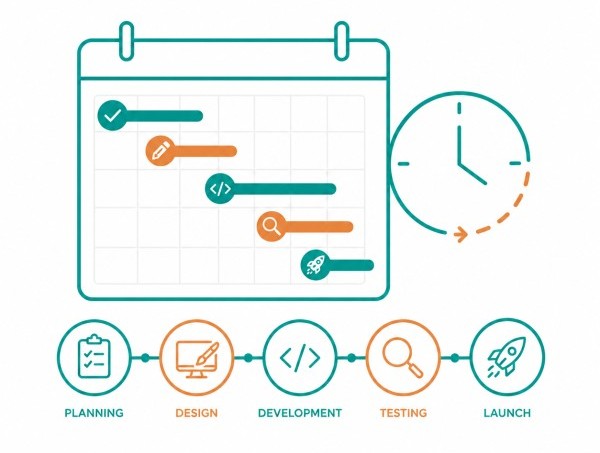
Project Timeline website design web design agancy bazarento
🚀 Trends

Website Design Trends

Website design continues to evolve as technology and user expectations change. Current trends focus on mobile-first experiences, faster performance, accessibility, and cleaner user interfaces while maintaining a strong focus on usability.
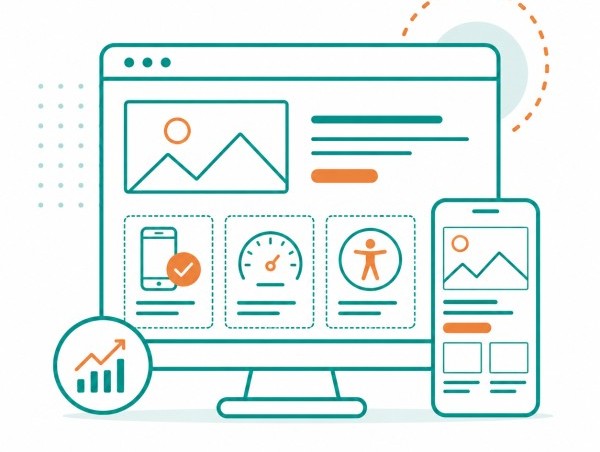

Website Design Trends website design web design agancy bazarento
Complete Guide to Website Design

Choosing the Right Web Design Partner

Choosing the right web design partner can have a major impact on the success of your website. Beyond visual design, a professional team should understand user experience, SEO, conversion optimization, and long-term business goals.
When evaluating an agency or freelancer, consider their experience, design process, SEO knowledge, and the level of support they provide after launch. The best projects are built on collaboration. A strong partner will take the time to understand your business, audience, and objectives before recommending solutions.
If you're looking for expert website development or redesign services, explore our Web Design solutions. Businesses across Canada can also learn more about our Web Design Canada services, while companies in the Greater Toronto Area can explore our Web Design Toronto solutions.

Complete Guide to Website Design

Conclusion

Website design is about more than creating an attractive online presence. A successful website combines user experience, visual design, SEO, performance, and business strategy to achieve meaningful results.
Whether you're building a new website or improving an existing one, investing in a strong foundation can help drive long-term growth, improve visibility, and create a better experience for your audience.

Article writer

Mehrnoosh Choobandian

Director of Bazarento
Ph.D. in Marketing
Marketing & Branding Strategist

Need Help Planning Your Website?

Looking for a website that not only looks professional but also generates results? Request a free consultation to discuss your project.

Leave a Reply

Your email address will not be published. Required fields are marked *